Animal Record History & Timeline
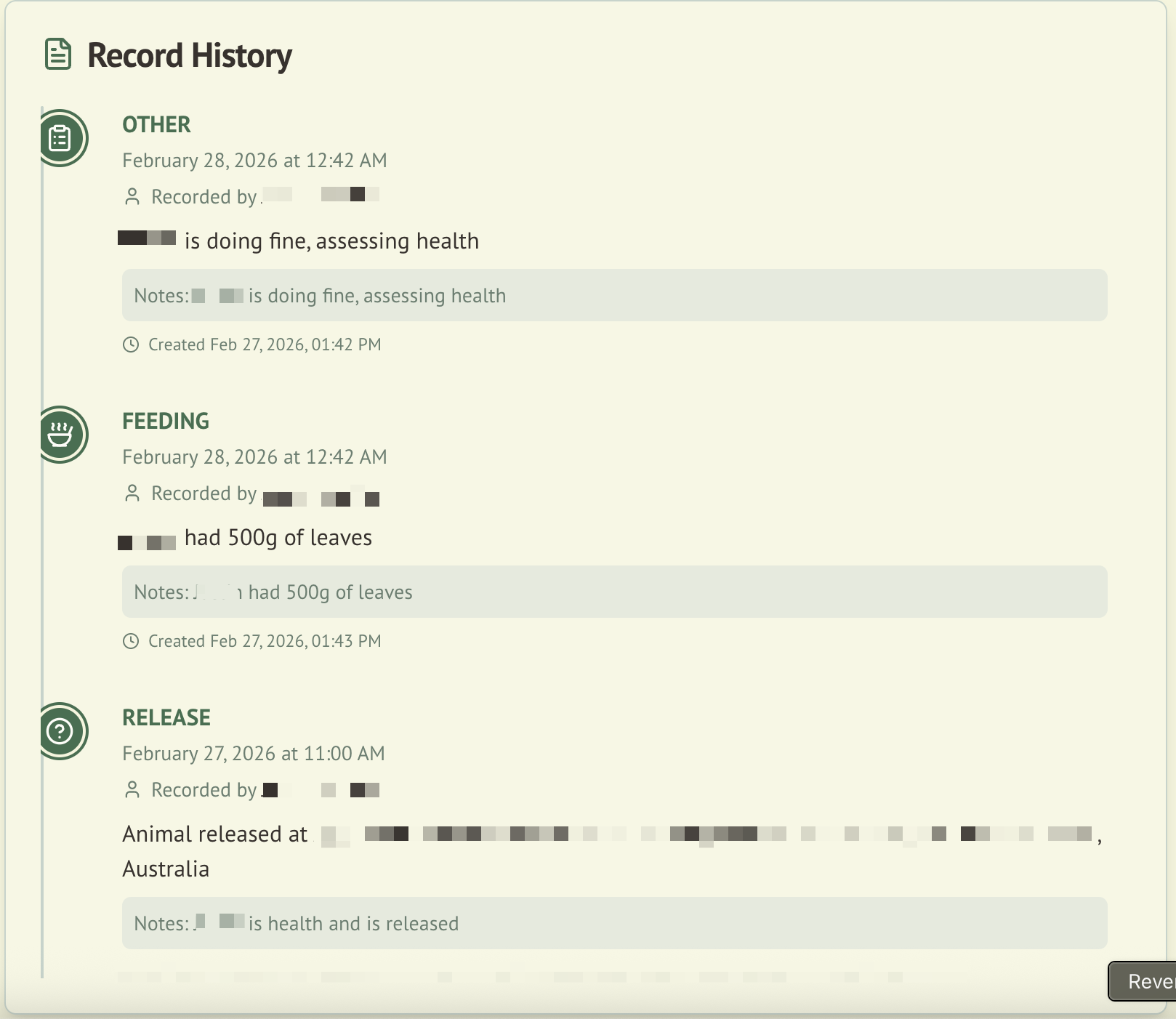
Every animal in WildTrack360 has a detailed record timeline that documents their entire journey from admission through to outcome. The timeline provides a chronological view of all care events, treatments, and status changes.
Overview
The record timeline appears on each animal's detail page and displays every record entry with full context, making it easy to review an animal's care history at a glance.
What's Shown in Each Record
Each timeline entry displays:
| Field | Description |
|---|---|
| Description | What happened (e.g., "Feeding", "Health check", "Medication administered") |
| Notes | Additional details or observations |
| Recorded by | The name of the person who created the record |
| Location | Where the activity took place (if applicable) |
| Created at | When the record was created |
| Updated at | When the record was last modified (if different from created) |
Adding Records
To add a new record to an animal's timeline:
- Navigate to the animal's detail page
- Use the record entry form at the top of the timeline
- Fill in the description, notes, and any other relevant fields
- Submit the record
New records appear immediately in the timeline without requiring a page refresh. The system uses optimistic updates so the full record (including server-generated fields like timestamps and the "recorded by" user) displays instantly.
Deleting Records
Each timeline entry has a trash button. Deleting a record opens a confirmation dialog that warns removal may affect compliance and activity reporting, so it is not done by accident.
Deletion is a soft delete — the record is hidden, never destroyed:
- The record is removed from the timeline and from all normal views (animal detail, print/report views, feed roster, and Wally lookups) straight away.
- It is retained in the database and still appears in the full data export, where the Records sheet flags it with Deleted, Deleted At, and Deleted By columns. This keeps the record ledger immutable for compliance.
- The deletion is audit logged, capturing who removed the record and when.
Deletion is scoped to your organisation and the animals you can access, and honours the same roles and permissions as the rest of the timeline.
User Name Resolution
The timeline resolves Clerk user IDs to display names so you see who recorded each entry rather than a technical identifier. This resolution happens server-side for performance and privacy.
Chronological View
Records are displayed in reverse chronological order (newest first), giving a clear picture of recent activity at the top. Each entry includes visual indicators to help distinguish between different types of records.
Integration with Other Modules
| Module | Integration |
|---|---|
| Wildlife Admission | Timeline is part of the animal detail page |
| Audit Logging | Record additions and edits are captured in the audit trail |
| Compliance | Complete record history supports record-keeping compliance requirements |
| Daily Operations | Daily care tasks are recorded as timeline entries |