Roles & Permissions (RBAC)
WildTrack360 implements a Role-Based Access Control (RBAC) system combined with Species-Based Access Control (SBAC) to ensure users only see and manage what's relevant to their responsibilities.
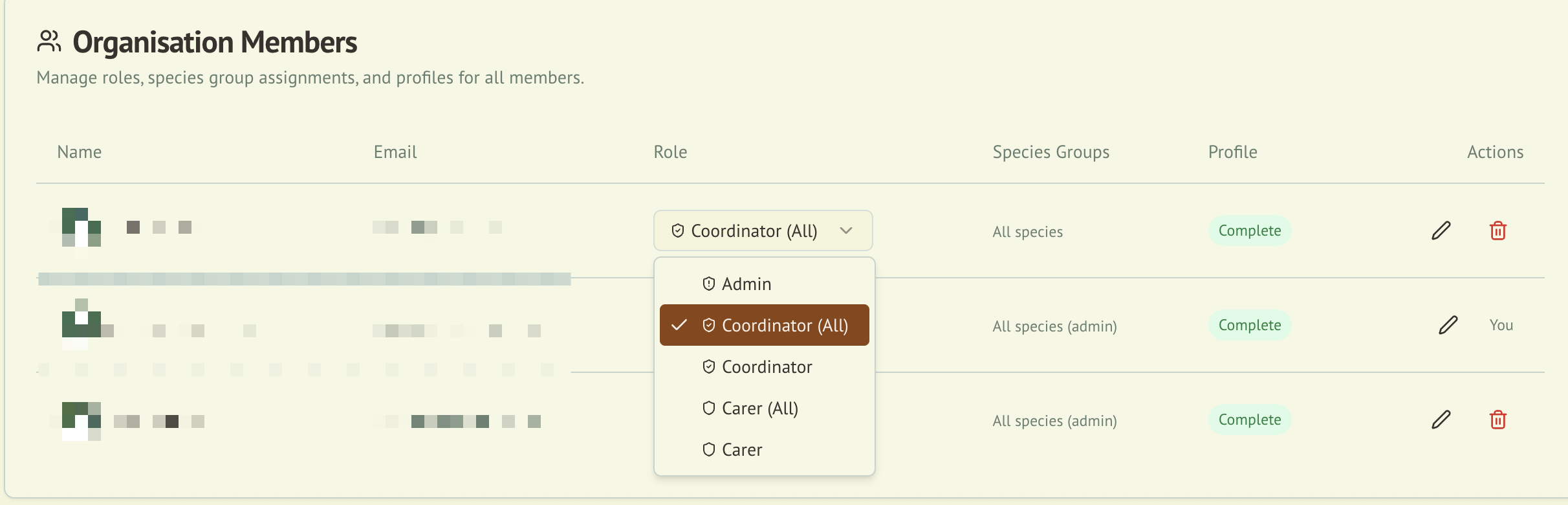
Overview
The RBAC system controls:
- Which pages and features a user can access
- Which animals a user can view and manage
- Which administrative actions a user can perform
- Which species groups a carer is qualified to handle
Roles
Admin
Full access to all system features and data.
| Capability | Access |
|---|---|
| View all animals | Yes |
| Edit any animal | Yes |
| Manage users and roles | Yes |
| View audit logs | Yes |
| Compliance checklist | Yes |
| Generate reports | Yes |
| Custom Reporting | Yes |
| Manage species groups | Yes |
| Organisation settings | Yes |
| View member register | Yes |
| Manage members | Yes |
| Configure membership tiers & payments | Yes |
| View donations & payments | Yes |
Admins are automatically treated as eligible carers for all species groups, meaning they can be assigned to any animal without needing explicit species group assignments.
Coordinator
Manages carers and animals within their assigned species groups.
| Capability | Access |
|---|---|
| View animals in assigned species groups | Yes |
| Edit animals in assigned species groups | Yes |
| Assign carers to animals | Yes |
| Manage species group assignments for carers | Yes |
| View audit logs | No |
| Organisation settings | No |
| Custom Reporting | Yes |
| View member register | Yes (all-species coordinators) |
| View donations & payments | Yes (all-species coordinators) |
| Manage members or membership settings | No |
Carer
Day-to-day animal care within assigned species groups.
| Capability | Access |
|---|---|
| View animals in assigned species groups | Yes |
| Add records to assigned animals | Yes |
| Edit own profile | Yes |
| Manage other users | No |
| Access admin panel | No |
| Custom Reporting | No |
Membership & Payments permissions
When the Membership & Payments platform is enabled for your organisation, four additional permissions control access to members, tiers, and payment records:
| Permission | Allows | Granted to |
|---|---|---|
member:view_all | View the full member register and onboarding status | Admin, Coordinator (all species) |
member:manage | Create, edit, import, and archive members; grant gift memberships; publish news; message members; triage carer interest | Admin |
membership:configure | Manage membership tiers and Square/payment settings | Admin |
donation:view | View donations and payment records | Admin, Coordinator (all species) |
Custom Forms permissions
When Custom Forms is enabled for your organisation, three permissions control who can build forms and who can see what was submitted:
| Permission | Allows | Granted to |
|---|---|---|
form:manage | Create, edit, publish, archive, and delete forms; view version history and roll back; see draft and archived forms | Admin, Coordinator |
form:view_submissions | View every submission for a form, delete any submission, and export submissions to CSV or JSON | Admin, Coordinator |
form:submit | Fill in published forms; view and delete your own submissions | Everyone, including Carers |
Two things to note:
- Custom forms are not filtered by species. Species-scoped and all-species coordinators have identical access, and a published form is fillable by every member of the organisation regardless of species group. There is no per-form audience.
- Carers see only their own submissions. They can fill in any published form, but the submissions list shows only what they submitted, and the export buttons are not available to them.
Community access and moderation
When the Community beta is enabled for a person's home organisation, every active workspace role can read and contribute. This includes Admin, Coordinator (all species), Coordinator, Carer (all animals), and Carer.
Community access does not follow species assignments. It is also separate from operational data access: no animal, care, location, photo, or carer record is shared with Community automatically.
An organisation's Admin role does not grant Community moderation. Community moderators are appointed separately by a platform administrator. Moderators can review held contributions, reports, and appeals, and can manage Community content and chat rooms. Platform administrators control moderator appointments and other staff-only actions.
A Community mute blocks posting but still allows reading. A ban blocks both. Losing membership of the home organisation also revokes Community access.
Navigation and command palette
The workspace navigation bar shows a different set of destinations depending on your role. Admins and coordinators — both species-scoped and all-species — see an identical navigation; carers see a shorter one.
| Destination | Admin | Coordinator | Carer |
|---|---|---|---|
| Dashboard | Yes | Yes | Yes |
| Animals | Yes | Yes | Yes (as My Animals) |
| Call Logs | Yes | Yes | No |
| Compliance | Yes | Yes | No |
| Forms | Yes | Yes | Yes |
| Care Tools | Yes | Yes | Yes |
| Feed Roster | In Care Tools | In Care Tools | Yes |
| Organisation | Yes | Yes | No |
| Community | Yes | Yes | Yes |
Forms appears only when Custom Forms is enabled for your organisation. Community appears only when the Community beta is enabled for your active organisation. The Community pages then check access against the home organisation saved in your community profile.
The command palette (Cmd+K / Ctrl+K) filters to your role the same way. Carers see only the dashboard, animals, care tools, and the feed and growth calculators — the compliance, reporting, admin, and quick-action groups are hidden from them. Coordinators see everything except the shortcuts to admin people management and organisation settings. The palette only opens on workspace pages.
:::note If your navigation is missing The workspace bar only renders once WildTrack360 can resolve your role within an organisation. If you're signed in without an active organisation, you'll see no navigation and an empty command palette. Ask an admin to add you to the organisation. :::
Species-Based Access Control (SBAC)
SBAC works alongside RBAC to filter data based on species group assignments.
How It Works
- An admin or coordinator assigns one or more species groups to a carer (e.g., "Macropods", "Raptors", "Reptiles")
- The carer can only view and manage animals belonging to their assigned species groups
- When assigning a carer to an animal, the system only shows carers who are eligible for that animal's species group
- Admins bypass SBAC and can access all animals regardless of species group
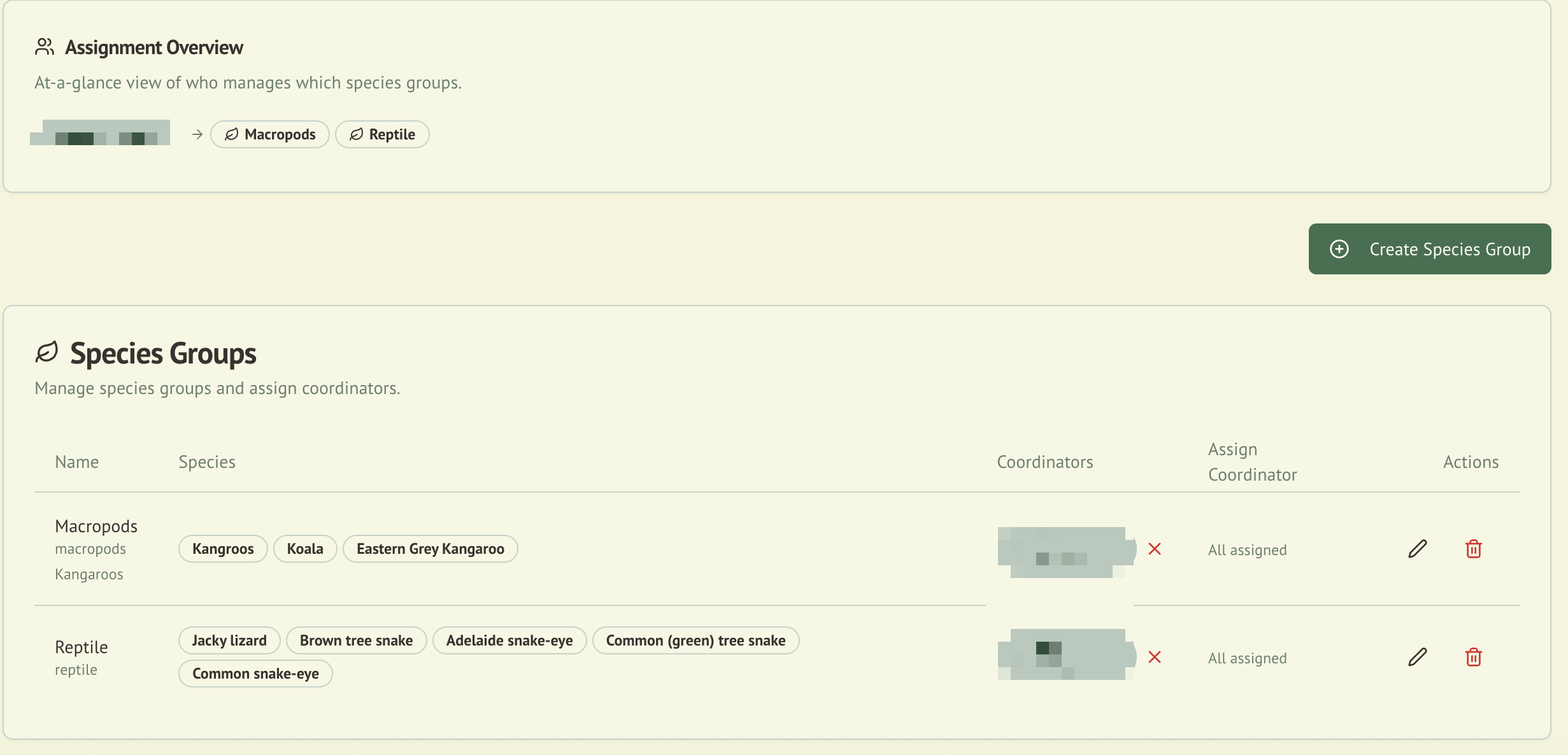
Species Group Assignment
Species groups are assigned using a clickable badge picker interface:
- Each species group appears as a toggleable badge
- Click a badge to add or remove the group from a carer's assignments
- Changes are saved immediately
- Only Coordinators and Admins can modify species group assignments
Role Assignment
Initial Setup
When a user first signs into WildTrack360, they are directed to a role provisioning page where they select their intended role. This self-service step creates their initial role record.
Changing Roles
Admins can change any user's role from the Admin Panel > Carer Profiles section:
- Navigate to the user's profile
- Select the new role from the role dropdown
- The change takes effect immediately
After assigning someone the CARER role, the system redirects to the Carer Profiles tab so you can immediately configure their species group access.
Role Migration
For organisations upgrading from an earlier version of WildTrack360 (before RBAC was introduced), a role migration page is available to assign roles to all existing Clerk users.
UI Guards
The interface adapts based on the user's role:
- Navigation: Menu items are shown or hidden based on role
- Pages: Attempting to access an unauthorised page redirects the user to their home dashboard
- Actions: Buttons and forms for unauthorised actions are not rendered
- API: All server-side endpoints independently verify role permissions, regardless of what the UI shows
Best Practices
- Assign the minimum role needed for each user's responsibilities
- Use species group assignments to limit carer access to the animals they're qualified to handle
- Regularly review role assignments from the admin panel
- Admins should be limited to organisation leaders who need full system oversight
AI and Reporting Access
Wally uses the same role and species-access rules as the signed-in user. He can summarise only the operational context visible to that user.
Custom Reporting is limited to Admin and Coordinator-level users because it produces organisation-level aggregate reports. Carers do not have access to the Custom Reporting workbench.
See Wally AI Assistant and Custom Reporting QL for details.