Asset Management
The Asset Management module provides comprehensive tracking and management of all physical resources used in wildlife rehabilitation operations, from cages and equipment to tracking devices and datasets.
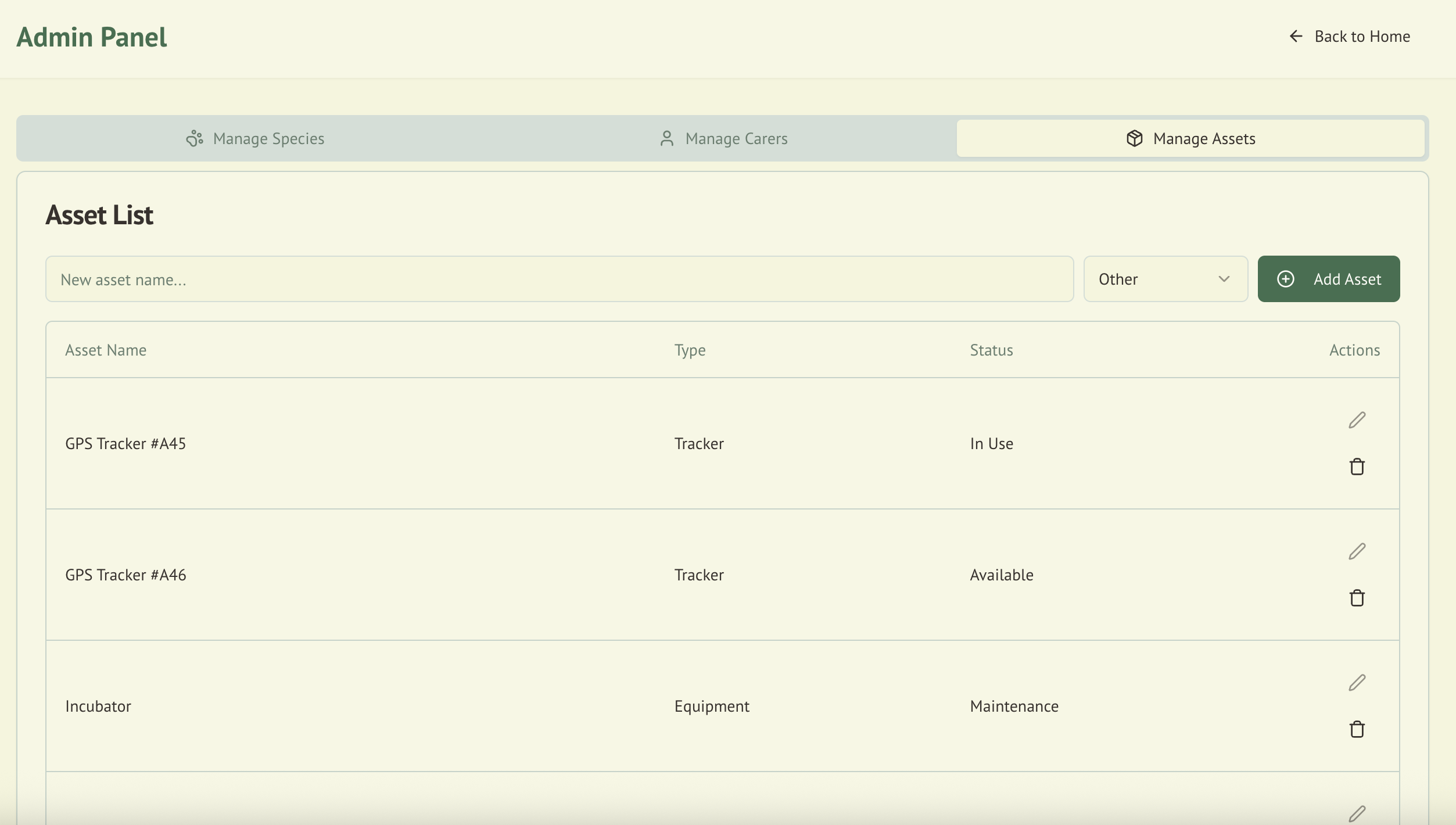
Overview
Effective asset management ensures:
- Resource availability when needed for animal care
- Maintenance tracking to prevent equipment failures
- Cost management through lifecycle tracking
- Compliance with equipment standards
- Efficient allocation of limited resources
Asset Categories
🏗️ Equipment
Physical items used in daily operations:
- Medical equipment (scales, syringes, thermometers)
- Feeding equipment (bottles, bowls, syringes)
- Cleaning supplies and tools
- Safety equipment (gloves, masks, protective clothing)
- Transport carriers and containers
🏠 Cages
Housing and enclosure assets:
- Permanent enclosures
- Portable cages
- Transport boxes
- Quarantine units
- Aviaries and flight cages
- Aquatic enclosures
📡 Trackers
Wildlife monitoring devices:
- GPS trackers
- Radio transmitters
- Microchip readers
- Camera traps
- Monitoring equipment
📊 Datasets
Information assets:
- Research data
- Historical records
- Training materials
- Protocol documents
- Reference guides
🔧 Other
Miscellaneous assets:
- Vehicles
- Computers and tablets
- Communication devices
- Office equipment
- Facility infrastructure
Asset Information Fields
Core Details
| Field | Type | Required | Description |
|---|---|---|---|
| ID | String | Yes | Auto-generated unique identifier |
| Name | String | Yes | Descriptive asset name |
| Type | Enum | Yes | Equipment, Cage, Tracker, Dataset, Other |
| Status | Enum | Yes | Available, In Use, Maintenance, Retired, Lost |
| Description | Text | No | Detailed asset description |
| Serial Number | String | No | Manufacturer's serial number |
| Model | String | No | Model name/number |
| Manufacturer | String | No | Manufacturing company |
Location & Assignment
| Field | Type | Required | Description |
|---|---|---|---|
| Location | String | No | Current physical location |
| Assigned To | String | No | Person/area currently using |
| Check-out Date | Date | No | When asset was assigned |
| Expected Return | Date | No | Anticipated return date |
| Previous User | String | No | Last person to use asset |
Financial Information
| Field | Type | Required | Description |
|---|---|---|---|
| Purchase Date | Date | No | When asset was acquired |
| Purchase Price | Number | No | Original cost |
| Supplier | String | No | Where purchased from |
| Warranty Expiry | Date | No | End of warranty period |
| Depreciation | Number | No | Annual depreciation rate |
| Current Value | Number | No | Estimated current worth |
Maintenance & Service
| Field | Type | Required | Description |
|---|---|---|---|
| Last Maintenance | Date | No | Most recent service date |
| Next Service Due | Date | No | Scheduled maintenance |
| Service Provider | String | No | Maintenance contractor |
| Service History | Array | No | Log of all services |
| Condition | Enum | No | Excellent, Good, Fair, Poor |
| Notes | Text | No | Additional information |
Asset Status Types
🟢 Available
- Ready for immediate use
- Passed recent inspection
- No outstanding maintenance
- Properly stored/located
🔵 In Use
- Currently assigned
- Active deployment
- User responsible for care
- Return date tracked
🟡 Maintenance
- Undergoing service/repair
- Scheduled maintenance
- Awaiting parts
- Temporarily unavailable
⚫ Retired
- End of useful life
- No longer safe/functional
- Awaiting disposal
- Historical record only
🔴 Lost
- Cannot be located
- Potentially stolen
- Investigation required
- Insurance claim possible
Asset Management Features
Quick Actions
The asset management interface provides rapid access to common tasks:
Add New Asset
- Click Add Asset button
- Enter basic information
- Set initial status
- Assign location
- Save to database
Edit Asset
- Select asset from list
- Click edit icon
- Update information
- Add notes if needed
- Save changes
Delete Asset
- Select asset
- Click delete icon
- Confirm removal
- Asset marked as deleted
- Retained in archive
Advanced Features
Bulk Import
Import multiple assets via CSV:
Name,Type,Status,Location,Serial,Purchase Date
Portable Cage A1,Cage,Available,Storage Room,PC-001,2024-01-15
Digital Scale,Equipment,In Use,Treatment Room,DS-2024-01,2024-02-20
GPS Tracker #5,Tracker,Available,Office,GPS-005,2023-11-10
QR Code Generation
- Generate unique QR codes for assets
- Print labels for easy scanning
- Mobile app integration
- Quick status updates
Maintenance Scheduling
- Set recurring maintenance
- Service history tracking
- Cost analysis
- Maintenance calendar view
Asset Lifecycle Management
1️⃣ Acquisition
- Purchase order creation
- Delivery verification
- Initial inspection
- Database entry
- Label/tag application
2️⃣ Deployment
- Assignment to user/location
- Training if required
- Documentation update
- Usage tracking begins
3️⃣ Operation
- Regular use monitoring
- Performance tracking
- Issue reporting
- Utilization analysis
4️⃣ Maintenance
- Scheduled service
- Repairs as needed
- Cleaning/calibration
- Documentation
5️⃣ Retirement
- End-of-life assessment
- Data backup (if applicable)
- Disposal planning
- Replacement ordering
- Archive records
Integration with Other Modules
Wildlife Admission
- Equipment used per animal
- Cage assignments
- Tracker deployments
- Treatment equipment
Incident Reporting
- Equipment failures
- Lost asset reports
- Damage documentation
- Insurance claims
Daily Operations
- Equipment check-outs
- Cleaning schedules
- Maintenance tasks
- Inventory counts
Best Practices
Asset Tracking
- Label everything: Use consistent naming conventions
- Regular audits: Monthly physical counts
- Update immediately: Record changes as they happen
- Photo documentation: Maintain visual records
- Location accuracy: Be specific about storage
Maintenance Management
- Preventive schedule: Don't wait for failures
- Document everything: Keep service records
- Budget planning: Anticipate replacement needs
- Vendor relationships: Maintain service contacts
- Spare parts: Keep critical items in stock
Cost Optimization
- Utilization analysis: Identify underused assets
- Sharing protocols: Enable resource sharing
- Lifecycle planning: Plan replacements
- Bulk purchasing: Coordinate acquisitions
- Disposal value: Recover value from retired assets
Reports and Analytics
Standard Reports
- Asset Inventory: Complete listing with status
- Maintenance Schedule: Upcoming service needs
- Utilization Report: Usage statistics
- Cost Analysis: Financial overview
- Depreciation Schedule: Value tracking
Custom Analytics
- Asset availability trends
- Maintenance cost analysis
- Lifecycle optimization
- User allocation patterns
- Loss/damage tracking
Mobile Access
The Asset Management module is fully mobile-responsive:
- Barcode scanning: Quick asset lookup
- Photo capture: Document condition
- GPS location: Track field equipment
- Offline mode: Sync when connected
- Quick status: Rapid updates
Security and Access Control
Permission Levels
- View Only: See asset information
- Check Out/In: Use assets
- Edit: Modify asset details
- Admin: Full control including deletion
Audit Trail
All actions are logged:
- Who made changes
- What was changed
- When it occurred
- Previous values
- Reason (if provided)