Compliance Management
WildTrack360's Compliance Management module helps your wildlife rehabilitation center meet all regulatory requirements across Australian jurisdictions. The system tracks compliance status and provides on-demand reporting capabilities.
:::caution Legal Disclaimer While we have made best efforts to accurately capture and implement compliance requirements, regulations may change without notice. Always refer to the official source documentation for the most current requirements. WildTrack360 and its developers take no responsibility for out-of-date information or compliance violations resulting from use of this system. This software is a tool to assist with compliance management but does not guarantee regulatory compliance. :::
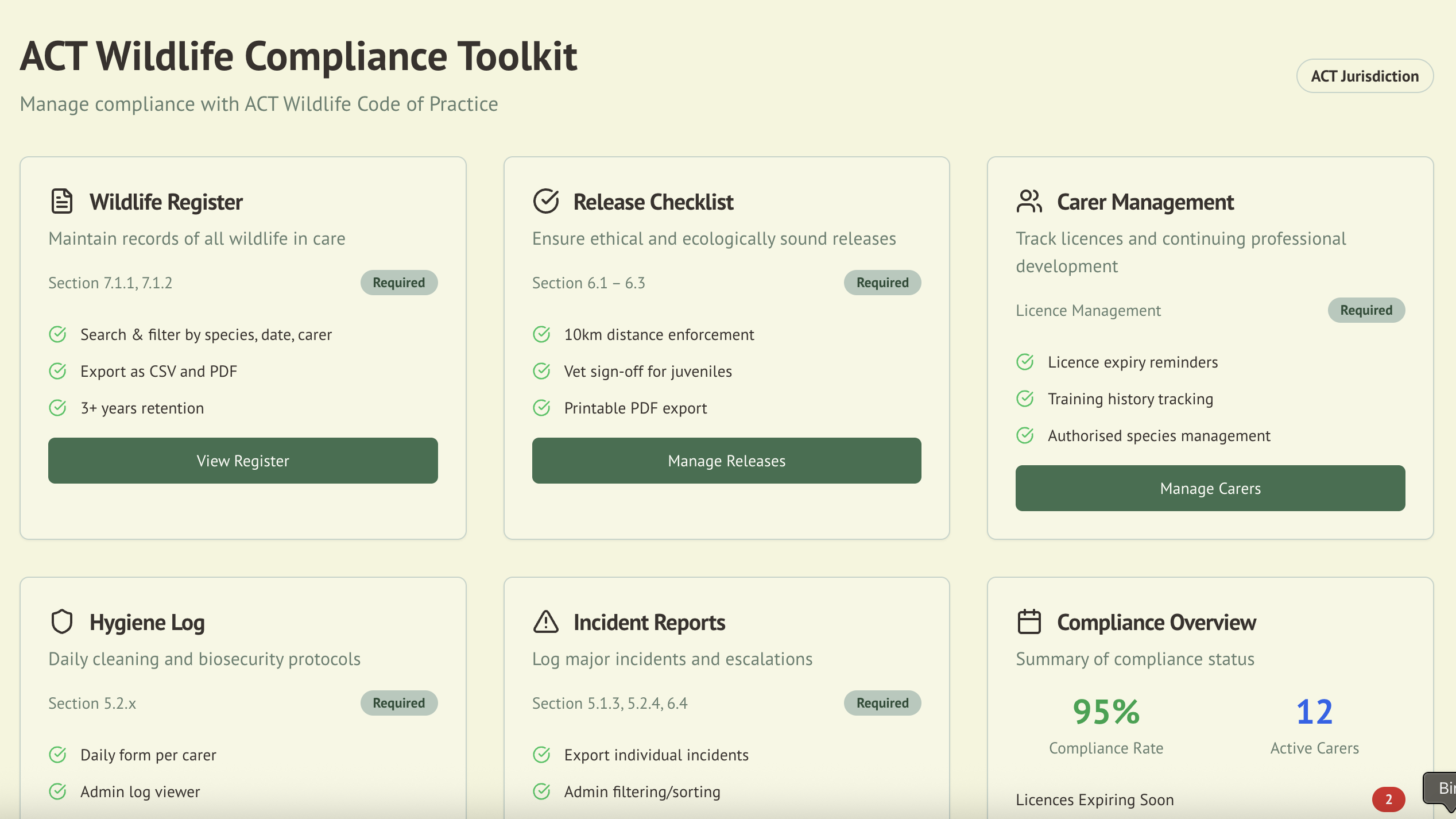
Overview
The Compliance module provides:
- Automated tracking of regulatory requirements
- Real-time monitoring of compliance status
- Jurisdiction-specific rule enforcement
- Automated reporting for regulatory submissions
- Document retention management
Supported Jurisdictions
:::info Important Note The compliance requirements listed below are based on our interpretation of official documents at the time of implementation. Regulations may have been updated since this software was developed. Always consult the current official documentation from the relevant authorities for definitive compliance requirements. :::
WildTrack360 currently supports two major Australian wildlife rehabilitation codes:
🏛️ Australian Capital Territory (ACT)
Code: ACT Wildlife Code of Practice 2020
Source: Official ACT Wildlife Code of Practice 2020 (PDF)
- Comprehensive record keeping (Section 7)
- Release requirements (Section 6)
- Hygiene and biosecurity (Section 5)
- Carer management (Section 4)
🏖️ New South Wales (NSW)
Code: Code of Practice for Injured, Sick and Orphaned Protected Fauna
Source: Official NSW Code of Practice (PDF)
DCCEEW Compliance: Full support for Department of Climate Change, Energy, the Environment and Water reporting requirements
- Record keeping standards (Section 14)
- Suitability for release (Section 11)
- Release considerations (Section 12)
- Training requirements (Section 13)
- NSW Wildlife Rehabilitation Combined Annual Report generation
- Encounter type tracking (70+ DCCEEW-specified categories)
- Fate/outcome tracking with NSW-specific options
Compliance Categories
📝 Record Keeping
Critical for all jurisdictions, record keeping compliance includes:
Required Records
- Wildlife Admission Register: Complete animal records from rescue to outcome
- Daily Care Logs: Feeding, medication, and treatment records
- Transfer Documentation: Records when animals move between carers
- Outcome Records: Release, death, or permanent care documentation
Retention Periods
| Jurisdiction | Animal Records | Incident Reports | Hygiene Logs | Release Checklists |
|---|---|---|---|---|
| ACT | 3 years | 3 years | 3 years | 3 years |
| NSW | 2 years | 2 years | 1 year | 2 years |
Export Requirements
- CSV Format: For data analysis and bulk submissions
- PDF Format: For official documentation and archiving
- Automated Backups: Regular export scheduling available
🚁 Release Requirements
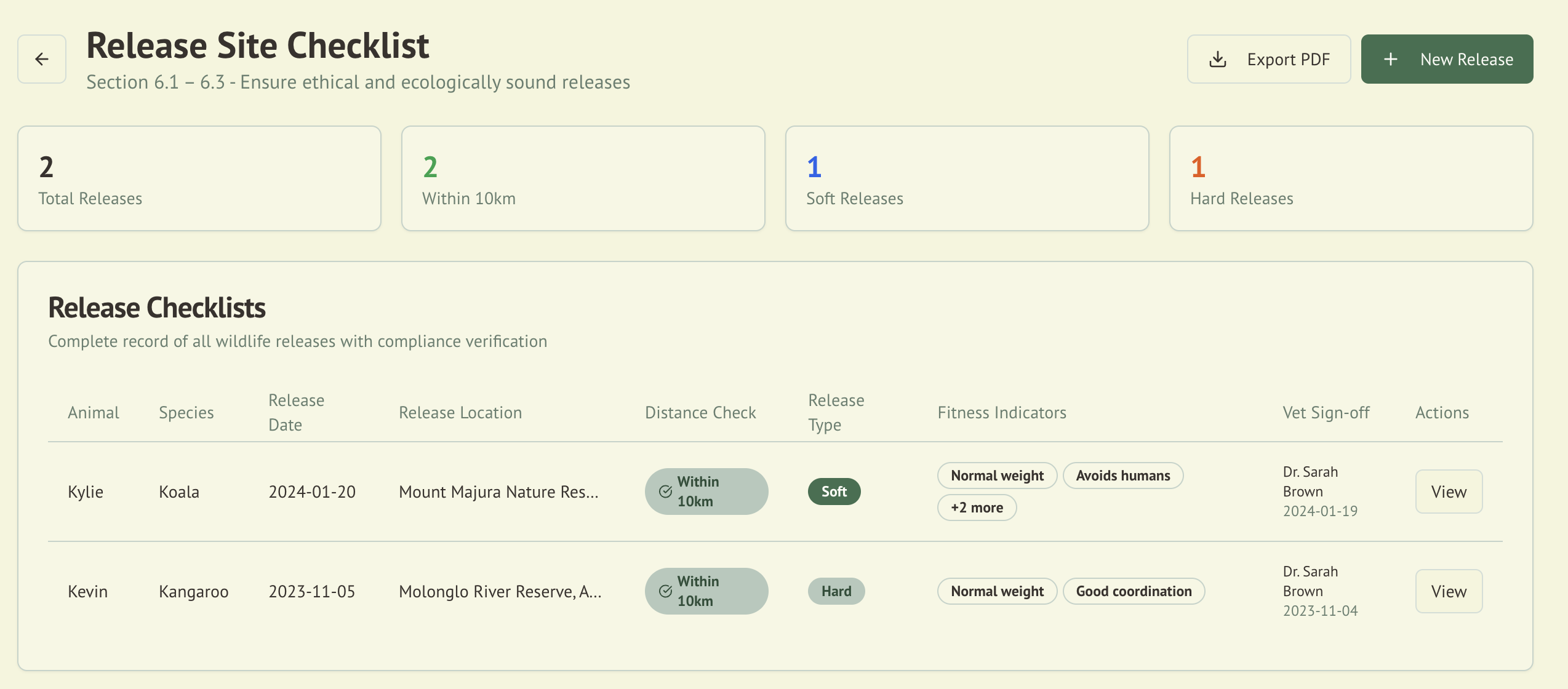
Release compliance ensures animals are returned to appropriate locations:
Distance Requirements
| Jurisdiction | Minimum Distance | Enforcement | GPS Verification |
|---|---|---|---|
| ACT | 10 km | Mandatory | Required |
| NSW | No minimum | Advisory | Optional |
Release Checklist Components
- Health Assessment: Animal fitness for release
- Behavioral Assessment: Natural behaviors exhibited
- Site Suitability: Habitat and food availability
- Weather Conditions: Appropriate for species
- Veterinary Sign-off: Required for juveniles in ACT
🧼 Hygiene & Biosecurity
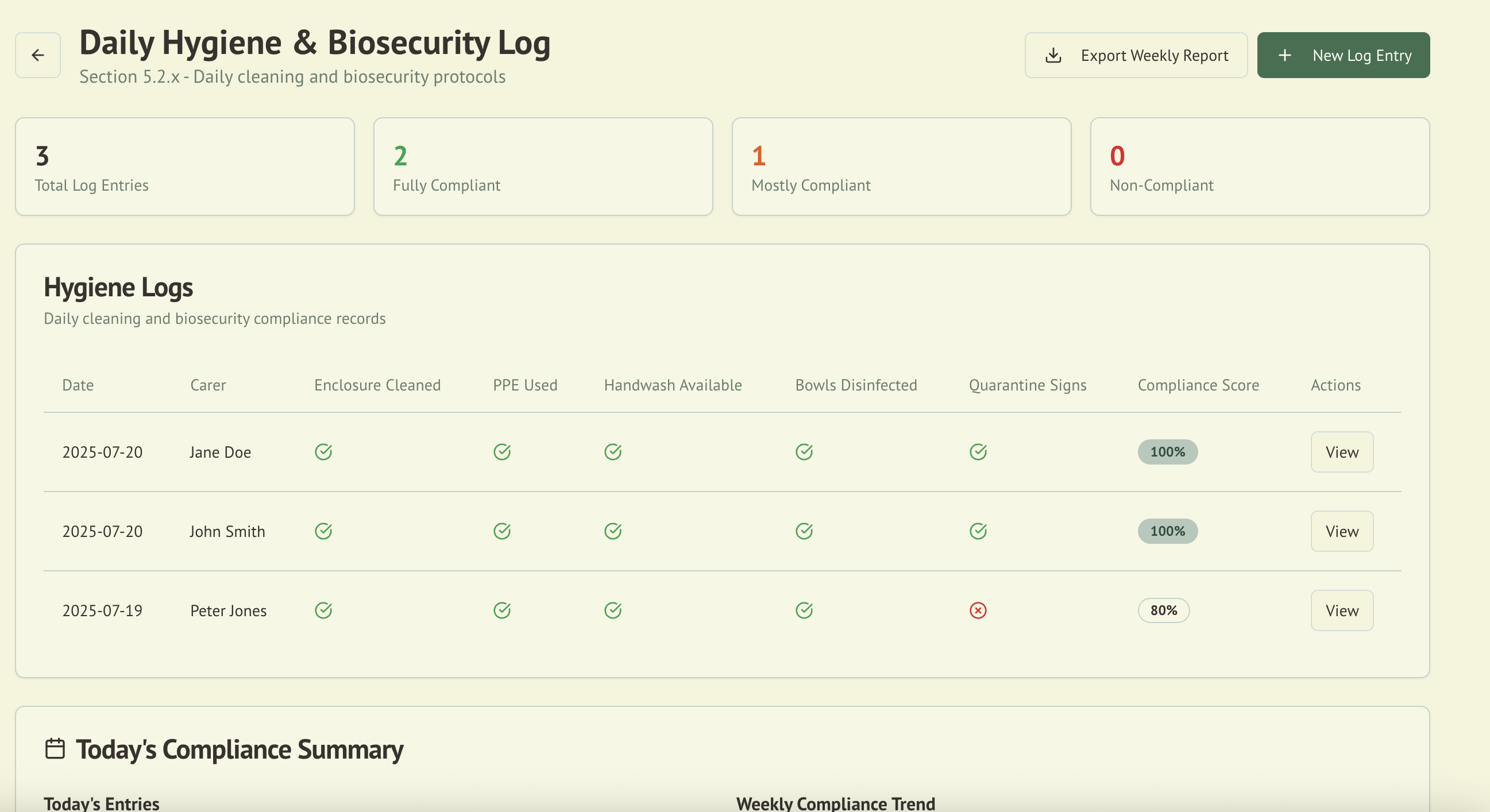
Daily hygiene compliance tracking includes:
Daily Requirements
- Enclosure Cleaning: Documentation of cleaning protocols
- PPE Usage: Personal protective equipment tracking
- Handwashing Stations: Availability and maintenance
- Equipment Disinfection: Feeding bowls and tools
- Quarantine Protocols: Isolation signage and procedures
Documentation Standards
- Daily log completion
- Photo documentation (optional)
- Supervisor verification
- Weekly summaries
- Monthly compliance reports
🚨 Incident Management
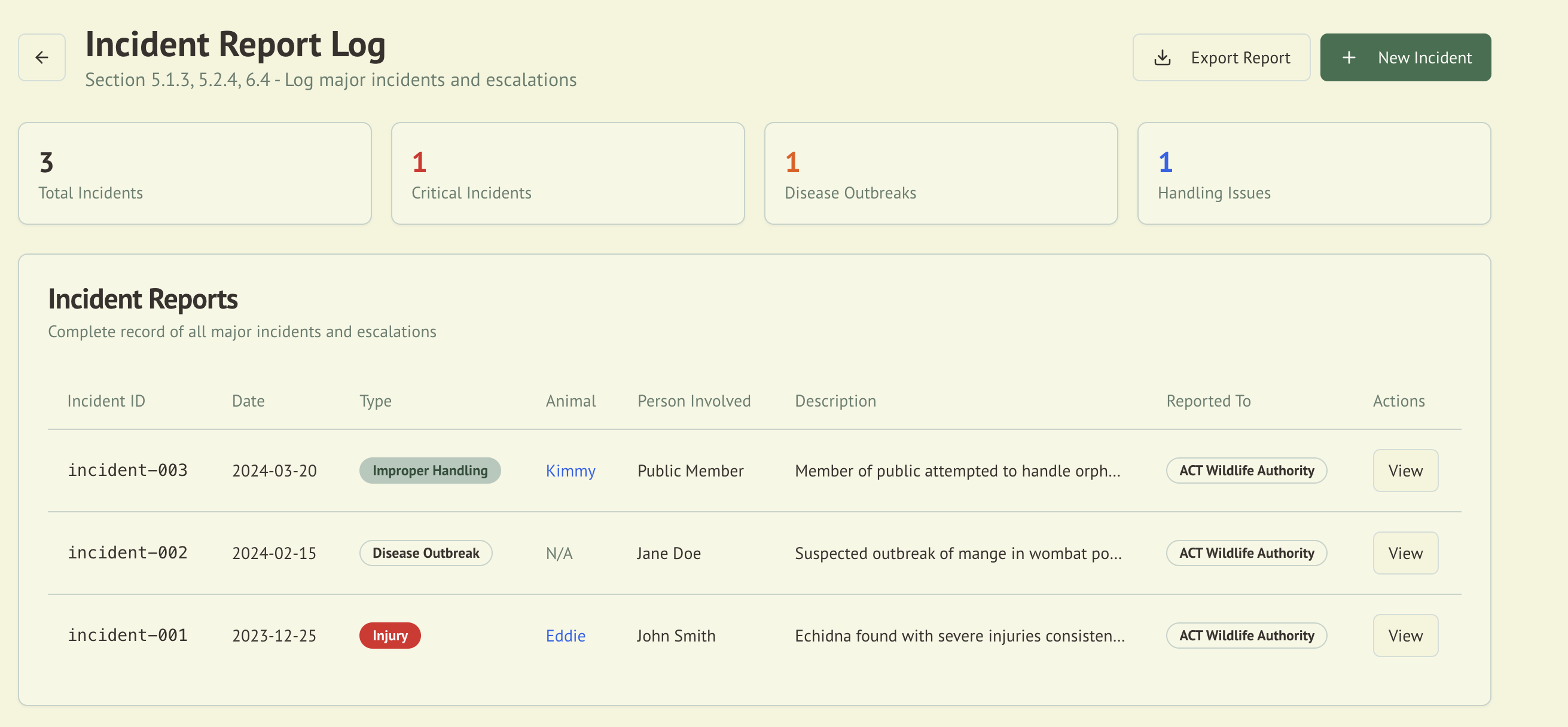
Incident reporting compliance covers:
Reportable Incidents
- Animal Escapes: Immediate reporting required
- Disease Outbreaks: Veterinary involvement mandatory
- Serious Injuries: To animals or personnel
- Death Events: Unexpected mortality
- Equipment Failures: Affecting animal welfare
Reporting Timeline
| Incident Type | ACT | NSW |
|---|---|---|
| Escape | Immediate | 24 hours |
| Disease | Immediate | Immediate |
| Death (suspicious) | 24 hours | Immediate |
| Equipment failure | 48 hours | 72 hours |
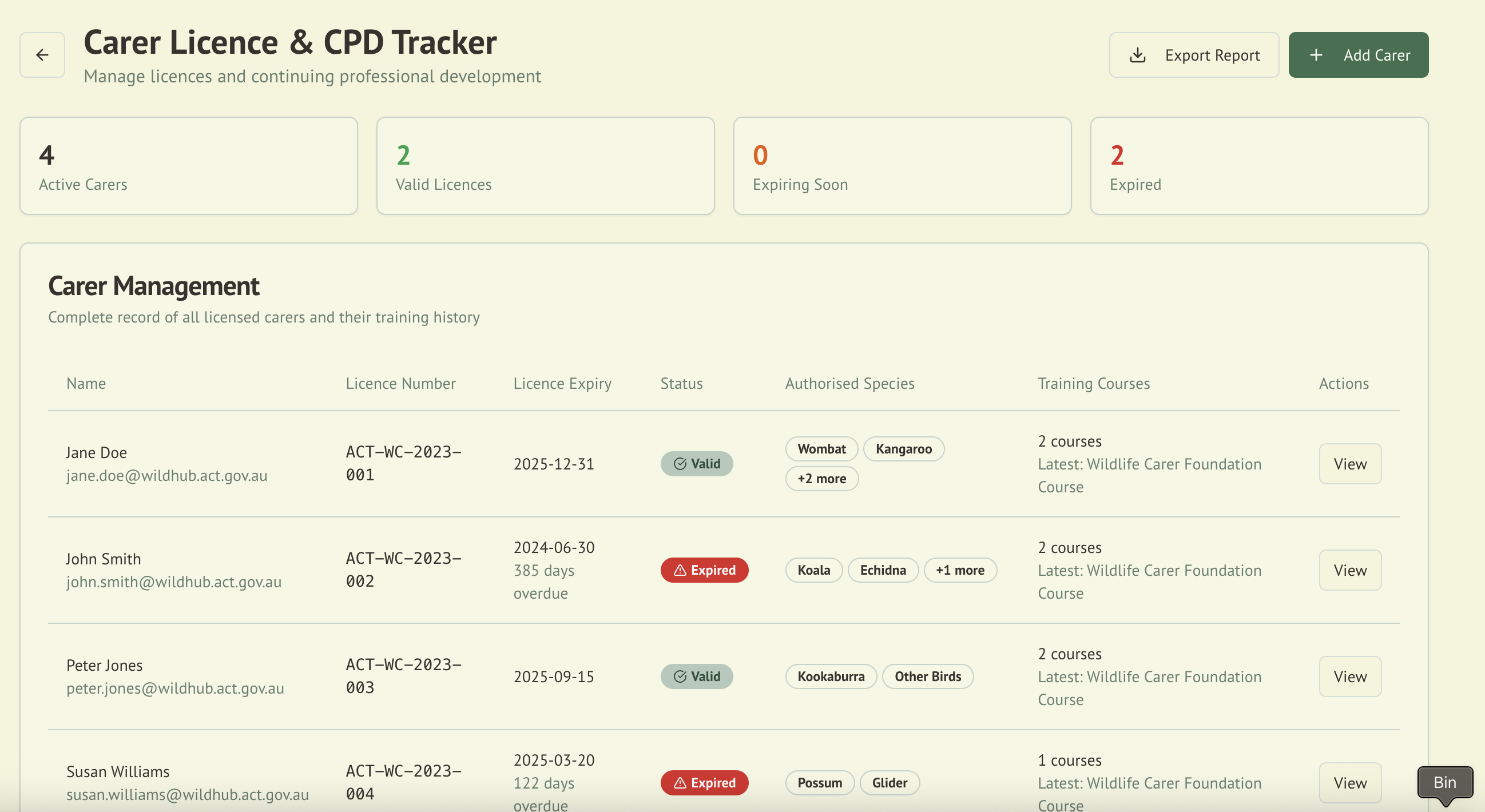
👥 Carer Management
Carer compliance requirements include:
License Management
- Current Licenses: Valid and up-to-date
- Species Authorizations: Approved species list
- Training Records: Completed courses and workshops
- CPD Requirements: Continuing professional development
Training Requirements
| Jurisdiction | Basic Training | Species-Specific | Annual CPD |
|---|---|---|---|
| ACT | Mandatory | Required | 10 hours |
| NSW | Mandatory | Recommended | Advisory |
Compliance Scoring System
WildTrack360 uses a comprehensive scoring system to track compliance:
Score Calculation
- 0-100 Scale: Overall compliance percentage
- Category Weights: Different areas have different importance
- Real-time Updates: Scores change as data is entered
- Historical Tracking: Monitor improvement over time
Score Breakdown
| Category | Weight | Impact |
|---|---|---|
| Record Keeping | 35% | High |
| Release Compliance | 25% | High |
| Hygiene Protocols | 20% | Medium |
| Incident Management | 10% | Medium |
| Carer Management | 10% | Low |
Status Indicators
- 🟢 Green (90-100%): Fully compliant
- 🟡 Yellow (70-89%): Minor issues
- 🔴 Red (Below 70%): Requires immediate attention
Automated Compliance Features
🤖 Auto-Detection
WildTrack360 automatically detects compliance issues:
- Missing required fields
- Overdue documentation
- Expired licenses
- Distance violations
- Retention period breaches
📊 Dashboard Widgets
Real-time compliance monitoring:
- Overall compliance score
- Category breakdowns
- Trending indicators
- Action items list
- Upcoming requirements
Regulatory Reporting
NSW Wildlife Rehabilitation Combined Annual Report
:::warning Compliance Notice The NSW Annual Report generator is designed to match DCCEEW requirements as understood at the time of development. You are responsible for verifying that the generated report meets current DCCEEW standards before submission. Report formats and requirements may change. Always check with NPWS/DCCEEW for the latest reporting requirements. :::
WildTrack360 now provides automated generation of the NSW Wildlife Rehabilitation Combined Annual Report, fully compliant with DCCEEW requirements as of 2024/2025:
Report Components
The system automatically generates all required worksheets:
- Nil Return Sheet: For periods with no activity
- Transferred Animal Register: Animals moved to other organizations
- Permanent Care Register: Animals unable to be released
- Preserved Specimen Register: Scientific specimens
- Register of Members: Complete carer/member listing with rehabilitation authorizations
- Privacy Notice: Standard NPWS privacy statement
Data Collection
The system automatically collects and formats:
- Encounter Types: 70+ DCCEEW-specified categories organized by type
- Animal Conditions: Good, Fair, Poor, Emaciated, Moribund
- Pouch Conditions: For marsupials (15 developmental stages)
- Fate/Outcomes: 30+ NSW-specific outcome options
- Address Components: Street address, suburb/town, postcode for all locations
- Weight Records: Initial weight in grams for all admissions
Report Generation Process
- Navigate to Compliance → NSW Annual Report
- Specify reporting period (defaults to current calendar year)
- Verify organization details (auto-populated from Clerk)
- Click Generate Report
- Excel file downloads in official DCCEEW format
- Submit directly to NPWS without modification
NSW Reporting Reminders
To help NSW organisations avoid missed deadlines, WildTrack360 surfaces seasonal reminder banners (and matching reminder emails) in the run-up to the two key NSW reporting dates:
| Window | Deadline | What it prompts |
|---|---|---|
| Early–mid June | 30 June (end of financial year) | Review and complete outstanding animal records before the reporting period closes. |
| Late August – September | 30 September (annual return) | Generate and email your Detailed and Combined reports to NPWS/DCCEEW. |
Each reminder shows a live countdown to the actual deadline — the wording tightens as the date approaches (for example "in 14 days", then "in 1 day", then "today") rather than displaying a fixed label for the whole window. Countdowns are calculated in Sydney local time, so the count you see always reflects the real number of days remaining.
These reminders are advisory prompts based on standard NSW dates. Always confirm current deadlines and requirements with NPWS/DCCEEW.
Available Export Options
WildTrack360 provides on-demand export capabilities:
- NSW Combined Annual Report: Excel format matching DCCEEW template exactly
- PDF Reports: Generate compliance reports with current data
- CSV Exports: Download raw data for external analysis
- Date-stamped Files: All exports include generation date
Export Content
Exported reports include:
- Current Statistics: Total animals, status breakdown
- Compliance Scores: Overall percentage and category breakdowns
- Wildlife Register: Complete animal records with NSW-required fields
- Active Issues: Incidents, expired licenses, pending tasks
- Summary Data: Key metrics and counts
- Address Details: Full structured addresses for rescue and release locations
- NSW Compliance Data: Encounter types, conditions, fates, weights
Manual Reporting Process
To meet regulatory requirements:
- Generate exports at required intervals (monthly, quarterly, annually)
- Review data for completeness and accuracy
- Save files with appropriate naming conventions
- Submit to authorities as per jurisdiction requirements
- Archive copies for record retention compliance
Note: NSW organizations can now use the automated NSW Annual Report generator for streamlined DCCEEW compliance reporting.
Compliance Best Practices
:::info Best Practices Advisory These suggested practices are based on common compliance requirements but may not reflect current regulations in your jurisdiction. Always develop your compliance procedures based on current official requirements from your regulatory authority. :::
Daily Tasks
- ✅ Complete hygiene logs each morning
- ✅ Update animal statuses promptly
- ✅ Document all treatments given
- ✅ Record any incidents immediately
- ✅ Verify data accuracy before saving
Weekly Tasks
- 📋 Review compliance dashboard
- 📋 Export backup of records (manual)
- 📋 Check for expired licenses
- 📋 Verify carer assignments
- 📋 Update training records
Monthly Tasks
- 📊 Generate and export compliance PDF report
- 📊 Export wildlife register as CSV
- 📊 Manually submit reports to authorities
- 📊 Review data completeness
- 📊 Archive exported reports
Jurisdiction-Specific Guidelines
ACT Specific Requirements
- Release Distance: Strict 10km minimum enforcement
- Vet Sign-off: Required for all juvenile releases
- Hygiene Logs: Daily completion mandatory
- Incident Reporting: Immediate for escapes
- Record Retention: 3 years minimum
NSW Specific Requirements
- Individual Records: Detailed per-animal documentation
- Encounter type from 70+ DCCEEW categories
- Initial weight in grams
- Animal condition assessment (Good/Fair/Poor/Emaciated/Moribund)
- Pouch condition for marsupials (15 developmental stages)
- Fate/outcome from 30+ NSW-specific options
- Mark/band/microchip identification numbers
- Address Requirements: Full structured addresses required
- Street address, suburb/town, postcode for rescue locations
- Street address, suburb/town, postcode for release locations
- Automatic population from map pin drops
- Transfer Records: Must accompany animals
- Receiving organization details
- Unique ID assignment by receiving organization
- Complete address of receiving facility
- Member Register: Comprehensive carer documentation
- Executive positions
- Species coordinator roles
- Special authorization tracking (Koala, Flying-Fox, Bird of Prey)
- Member since dates
- Training levels
- Disease Reporting: Immediate reporting required
- Training: Basic training mandatory
- Record Retention: 2 years minimum
- Annual Reporting: NSW Wildlife Rehabilitation Combined Annual Report to DCCEEW
Integration with Other Modules
The Compliance module integrates with:
- Wildlife Admission: Validates required fields
- Asset Management: Equipment compliance
- Incident Reporting: Tracks reportable events
- Daily Operations: Hygiene log management
Troubleshooting Common Issues
Low Compliance Scores
- Check missing data: Review incomplete records
- Update expired items: Licenses and training
- Complete daily logs: Hygiene and care records
- Verify distances: Release location compliance
Report Generation Problems
- Verify date ranges: Ensure valid periods
- Check permissions: User access rights
- Review filters: Remove conflicting criteria
- Update browser: Use latest version
Official Documentation Sources
Primary References
- ACT Wildlife Code of Practice 2020: Download PDF
- NSW Code of Practice for Injured, Sick and Orphaned Protected Fauna: Download PDF
Additional Resources
- ACT Wildlife: https://actwildlife.net/
- NSW Environment: https://www.environment.nsw.gov.au/
:::caution Compliance Disclaimer While we have made our best efforts to accurately capture and implement compliance requirements in WildTrack360, we take no responsibility for out-of-date or incorrect information. Regulations and requirements can change at any time without notice.
You must always:
- Refer to the official source documentation for current requirements
- Verify that generated reports meet current standards before submission
- Maintain your own compliance procedures and checks
- Consult with relevant authorities when in doubt
This software is provided as a tool to assist with compliance management but does not guarantee regulatory compliance. Users are solely responsible for ensuring their wildlife rehabilitation activities meet all applicable laws and regulations.
For detailed compliance rules and regulations, always refer to the official documentation sources listed above. These documents contain the complete and authoritative regulatory requirements for wildlife rehabilitation in each jurisdiction. :::